
Most HVAC websites have the same problem. The owner knows the business inside out, 20 years of service, fully licensed, Google-rated 4.8 stars. But the website looks like it was built in 2014 and never touched since. Or worse, it was built on a template that looks fine until someone actually tries to use it on a phone.
In a dense market like Dallas, dozens of established HVAC companies compete for the same service calls. The website design choices that separate a site that converts from one that doesn't are smaller than most owners expect, and more actionable.
- The phone number must be visible and clickable above the fold on every page, HVAC customers call, they don't fill out forms.
- Top-performing HVAC sites load in under 3 seconds on mobile. Slow sites lose calls before anyone reads a word.
- Service-specific pages (not just a homepage) are how HVAC companies rank for individual search terms like "AC repair Dallas" and "furnace installation."
- Social proof, Google review count, star rating, and years in business, placed in the hero section reduces hesitation and increases call rates.
What Do HVAC Customers Actually Do on Your Website?
Before looking at design, it helps to understand what HVAC customers are doing when they land on your site. They're not browsing. They're verifying. Someone's AC failed on a 98-degree July afternoon in Dallas. They searched "AC repair near me," clicked your listing, and now they're asking one question: "Can I trust this company to show up and fix this today?"
Their path through your site is predictable. They land on your homepage or a service page. They look for your phone number immediately. If they can't find it in two seconds, they hit back. If they find it, they check your reviews, usually by looking at the star rating and total count in your header or footer. Then they might scroll to see your services and service area. If everything checks out, they call.
That's the full path. It's not complex, which means your website doesn't need to be complex either. It needs to be fast, credible, and frictionless.
Why Is the Phone Number the Entire Product?
This sounds obvious. Most HVAC owners believe their phone number is visible on their site. It's a surprisingly common gap: the number appears only in the footer, only in an image, only in text that doesn't link, or only visible on desktop and hidden on mobile.
Every page of your HVAC website needs a click-to-call phone number in the navigation bar. Not just the homepage, every page. When a customer lands on your "AC Repair" page from a Google search, they shouldn't have to navigate back to your homepage to find your number. It should be right there.
On mobile, the number should be a tel: link so one tap dials it. Test your site on a real phone, not just browser developer tools, and confirm the phone tap works before you declare this done.
Why Is Speed a Lead Generation Strategy?
Google's own research, published as "The Need for Mobile Speed," found that 53% of mobile visitors abandon a site that takes more than three seconds to load (Marketing Dive, reporting on Google's study). For HVAC companies, where customers are often in an urgent situation and on their phones, this stat is especially punishing. A slow website isn't just an inconvenience, it's a lead leaving to call your competitor.
The common culprits we see on HVAC websites: oversized images that were never compressed, WordPress themes loaded with plugins that add JavaScript on every page, and hosting plans that are too slow for the traffic they're receiving. These are fixable problems, but you won't know they're the problem unless someone actually measures your load time.
Use Google's free PageSpeed Insights tool to check your site. Enter your URL and look at the mobile score. A score below 70 means customers are leaving before your page finishes loading. Below 50 is a significant problem.
What slows HVAC sites down most
The most common culprits on HVAC sites: oversized images (photos of technicians and equipment uploaded directly from a phone camera at 4MB+), third-party chat widgets that load multiple scripts on every page, and unoptimized Google Fonts loading that blocks render. Each one has a straightforward fix, but you need to know which one is hurting you before you can fix it.
Why Does Every Service Need Its Own Page?
A common mistake on HVAC websites is listing all services on the homepage and calling it done. "We offer AC repair, installation, heating, and maintenance", with everything on one page. This approach fails for two reasons.
First, it doesn't rank. Google wants to serve the most relevant result for a specific search. Someone searching "furnace installation Dallas" is looking for a page about furnace installation in Dallas, not a page that mentions furnace installation in a list alongside six other services. A dedicated "Furnace Installation" page, optimized for that keyword, will rank far better than a generic homepage.
Second, it doesn't convert. When someone lands on your "AC Repair" page from a search, they want confirmation that you do exactly what they searched for. A page dedicated to AC repair in Dallas, with details on your process, your response time, your pricing approach, and customer reviews specific to that service, builds more confidence than a homepage that mentions it in passing.
At minimum, create separate pages for: AC repair, AC installation, heating repair, heating installation, and maintenance plans. If you serve multiple suburbs, add service area pages: "HVAC Dallas," "HVAC Frisco," "HVAC Plano." Each page targets a specific search and gives Google something concrete to index.
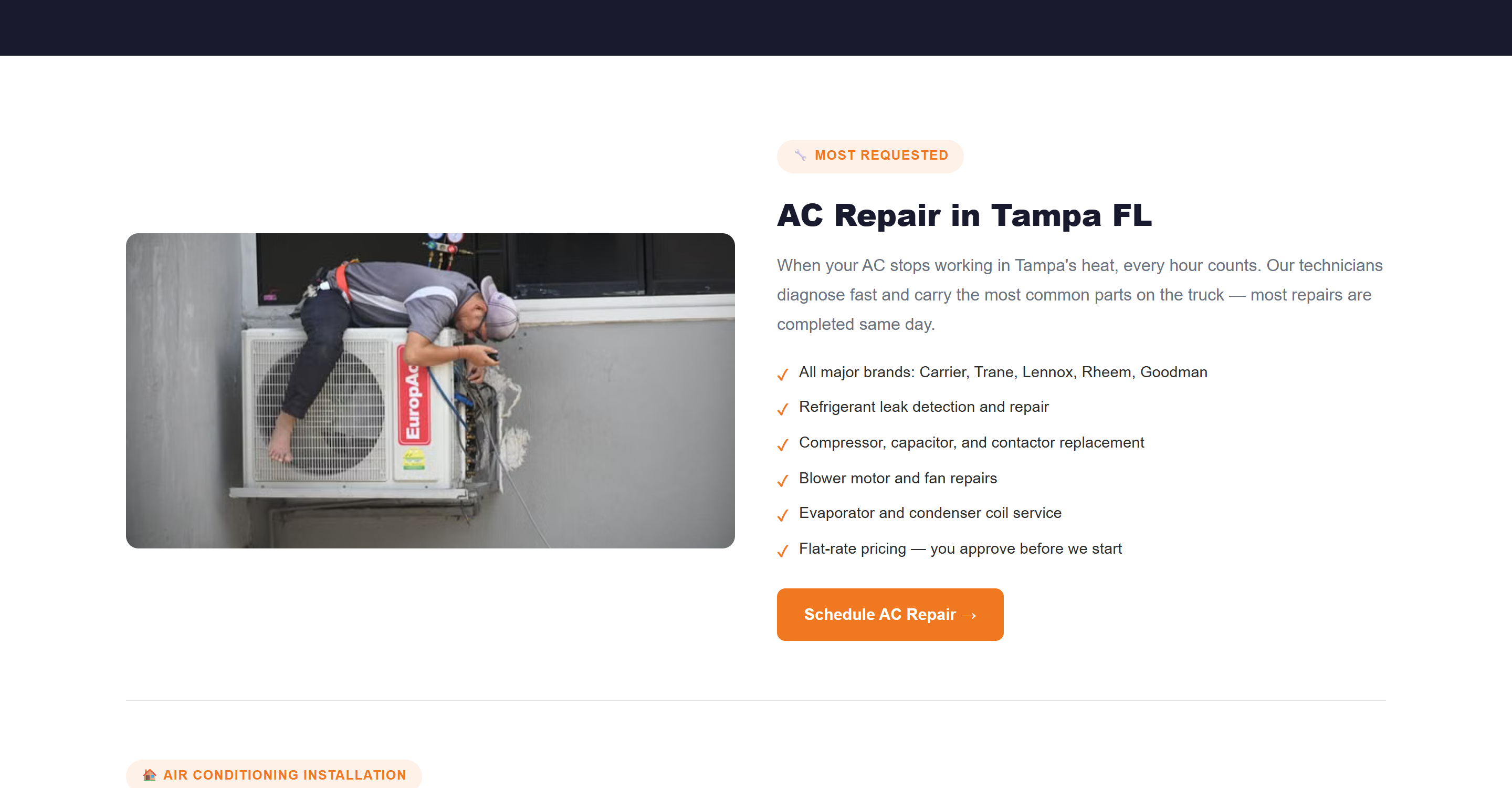
A dedicated service section from a CopperBuilds HVAC build: real photo, specific inclusions, its own CTA, not a one-line mention on the homepage.
Trust Signals in the Hero Section
The hero section, the first thing visible when someone lands on your page before scrolling, is your highest-value real estate. What you put there determines whether the customer keeps reading or leaves.
A hero section that converts needs a clear headline that states what you do and who you serve (for example, "Dallas's Trusted HVAC Company Since 2008"), a visible phone number, a specific credibility marker (number of Google reviews, BBB rating, or years in business), and a primary CTA button.
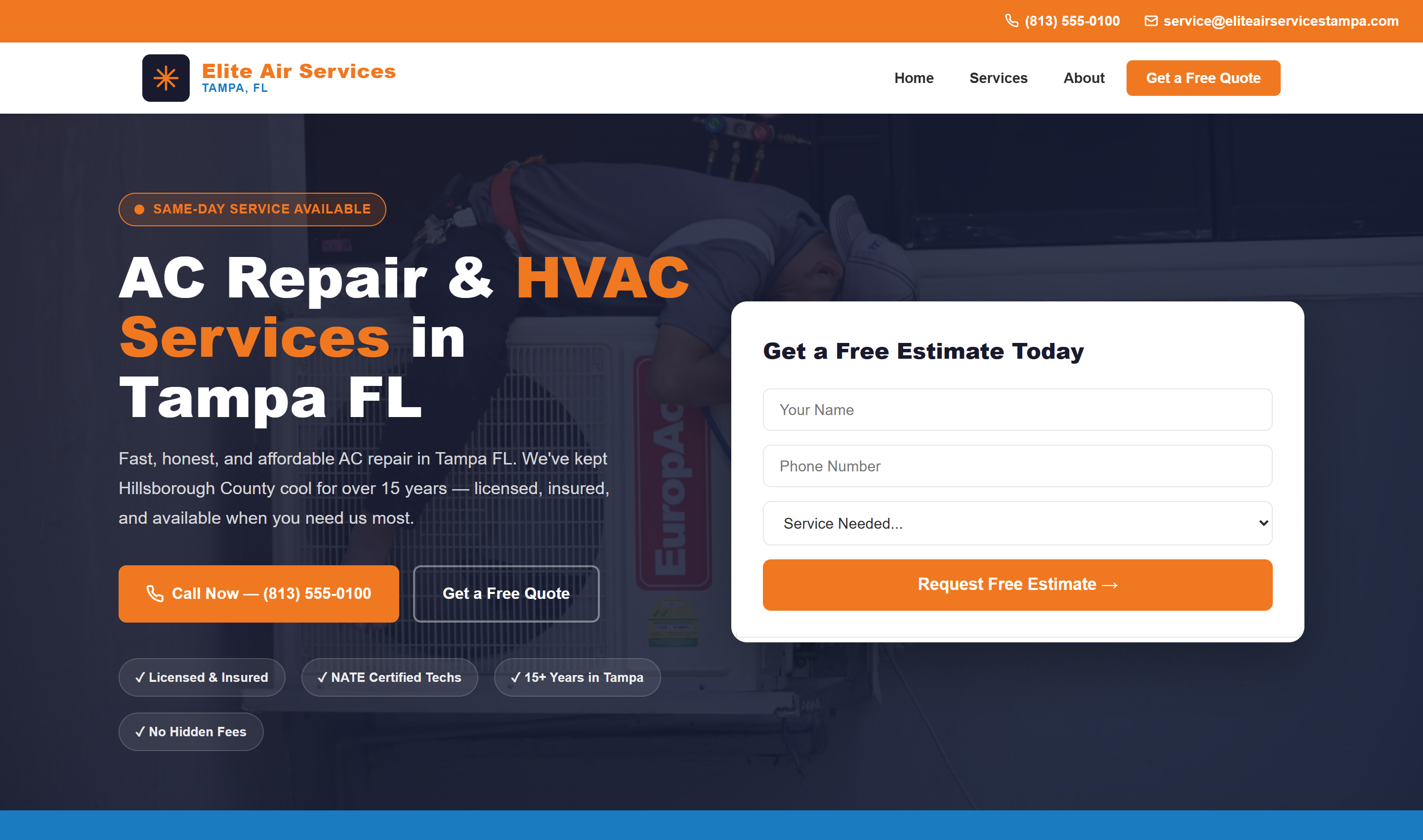
A CopperBuilds HVAC hero section: phone number, credibility markers, and the CTA all above the fold.
What they don't have: stock photos of generic AC units, vague taglines like "Quality You Can Trust," or a hero section that's mostly empty whitespace on mobile. Generic design signals generic service. Specific, credible design signals a company that knows what it's doing.
Reviews as social proof
If your company has 80+ Google reviews at 4.5 stars or better, that number should be in your hero section, not just in your footer or a separate "reviews" tab. "⭐ 4.8 Stars · 112 Google Reviews" placed near your phone number does more to reduce hesitation than almost anything else on the page. Customers trust other customers. Make that trust visible immediately.
What Do the Best HVAC Websites Leave Out?
The absence of certain elements is just as telling as their presence. A site built to generate calls avoids the following.
Live chat widgets from third-party services. These add load time, rarely convert HVAC customers (who call, not chat), and often create intrusive popups that hurt mobile experience. Remove them unless you have someone actively monitoring the chat 24/7.
Mandatory contact form gates. Some HVAC sites hide their phone number and push visitors toward a contact form. HVAC customers don't want to fill out a form and wait for a call back when their AC is broken at 5pm. The phone number should be the primary action, not a last resort.
Outdated licensing information. If your site says "Licensed in Texas since 2015" and it's now 2026, customers wonder what else is out of date. Update your credentials, team photos, and any dates on the site. Stale content erodes trust.
No service area clarity. "Serving the Dallas area" is too vague. List every city and suburb you actually serve. Customers in Plano or Garland want to know you'll actually come to them before they call. If you don't list their city, they assume you won't.
Should You Use a Website Builder or a Custom Build?
Wix and Squarespace are genuinely fine tools, they're just built for a different job. They're designed for a business owner to self-manage a simple site without hiring anyone, which is a reasonable tradeoff for some businesses. For an HVAC company competing for local search visibility, the tradeoff usually works against you.
Builder platforms generate bloated, generic underlying code that wasn't built with local SEO in mind, individual service pages, schema markup, and page-speed control are either missing or locked behind their own templates. You're also paying $15-30/month indefinitely for a site you don't fully own, versus a flat one-time build. The math flips fast: a $1,499 custom-built site pays for itself against 24-36 months of builder subscription fees, and that's before counting the leads a faster, better-optimized site converts that a template site doesn't.
Builder platforms make sense for a business that needs a placeholder page and isn't relying on organic search for leads. For an HVAC company where the website is doing real selling, the limitations show up as missed calls, not just missed design polish.
Star Ratings and Schema: Getting Reviews to Show in Search Results
Beyond the visible design, there's a technical layer that determines whether your Google star rating actually shows up next to your listing in search results. This requires Review and AggregateRating schema markup connected to your business, structured data that tells Google exactly what your rating is and how many reviews back it.
Most template-built HVAC sites don't have this configured at all, which means even a business with a strong 4.8-star rating shows up in search results with no visible stars, a wasted trust signal sitting right there in your reviews but invisible to anyone scanning results. Combined with LocalBusiness schema marking your service area and hours, this is what turns a plain blue link into a listing with stars, a category, and hours, visibly more credible before anyone even clicks.
For the SEO side of what makes these sites rank, our HVAC SEO breakdown covers the Google Business Profile and on-page factors in detail.
The same structure works across trades. For the wider checklist, read our guide to contractor website design, or see how it looks for roofing website design.
Need an HVAC website that generates real calls?
CopperBuilds builds fast, conversion-focused websites for HVAC companies, flat rate, no monthly fees. See what we'd build for your business.
Get a Free Website QuoteFrequently Asked Questions
Luis builds conversion-focused websites for small businesses across the US. He's audited over 50 local service business websites and writes about what actually moves the needle on conversions and local SEO.